Discover their next favorite.
Connect the streaming services you use. Choose the shows that feel right for your family. Brick your TV so kids only explore what you approve.
A TV Remote for Kids
TV can be scary. Parental controls aren’t great. Let’s make TV fun again by cutting the algorithm. No more multiple logins. You choose the shows. You brick the space. Kids watch in peace.
In development · No payment required
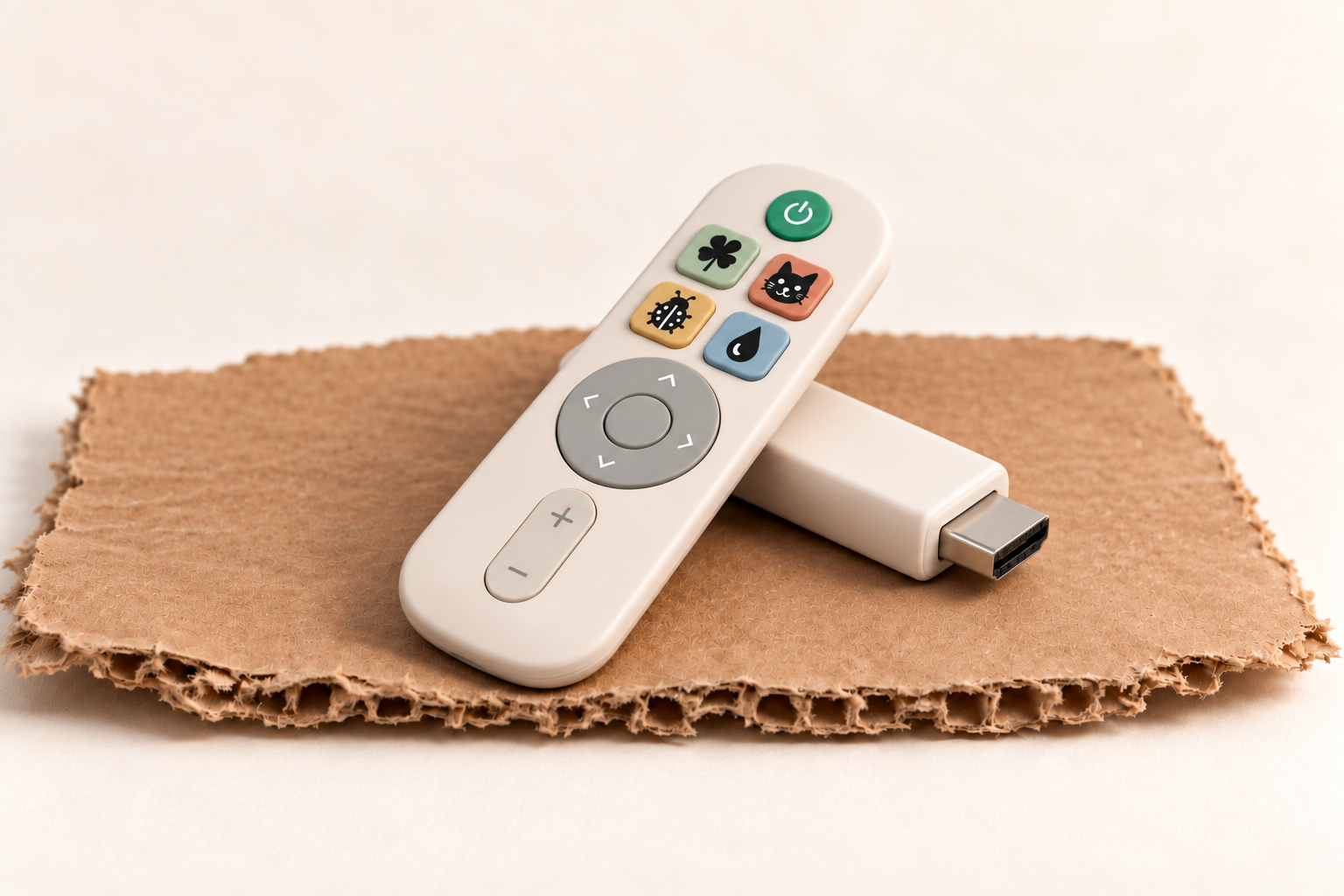
PRODUCT CONCEPT
A CARDBOARD BOX HAS THE RIGHT IDEA.
Room for their curiosity.
Boundaries you can feel good about.
A LITTLE GUIDANCE. A LOT OF INDEPENDENCE.
Connect the streaming services you use. Choose the shows that feel right for your family. Brick your TV so kids only explore what you approve.
Plug the compact HDMI stick into your TV. Everything you approve becomes a little world your child can explore with no autoplay or browsing.
Kids browse, discover, and choose for themselves within your approved library. Four favorite buttons take them straight to their favorite shows or movies.
FAMILIAR FAVORITES. NEW DISCOVERIES.
Favorite buttons open one show or movie for speedy access. The home screen holds everything you’ve approved, giving your child room to explore and discover something new. The TV is bricked so kids can’t accidentally or purposefully see other content.

Your approved shows & movies
9 approved titles · 4 favorite shortcuts
A little preview of their world. These titles show what’s possible; our streaming lineup is still taking shape. We’ll confirm services and availability before orders open.
BUILT AROUND YOUR FAMILY.
THEIR LITTLE WORLD
Scroll for more little adventures.
Your picks. Their freedom to explore.
Parent app prototype
Scroll, choose a show, and try bricking.
Your choices across all the streamers you watch. Suggestions by parents you trust.
Tap the remote to your phone and the TV is locked to the choices so kids can’t hack it.
Set viewing windows and time limits from the parent app.
Share lists of favorite shows and movies with friends and family. Discover recommendations from people who share your values, then choose what feels right for your kids.
GOOD THINGS COME IN SMALL BOXES.
Help us build a safer place for kids to explore.
Join for product updates and first access.
Estimated pricing. Final pricing and compatibility will be confirmed before purchase.
No payment. No commitment.
Just a little heads-up when we’re ready.
THE THINGS YOU’RE WONDERING.
Founded by Drew, a parent and former teacher who wanted a safer, simpler way for his kids to find shows like Sesame Street.
A product in development: a compact TV stick, a simple kid remote, and a parent app. Parents get suggestions for developmentally appropriate content and choose what to approve. Kids explore a home screen of all those shows and movies. Four favorite buttons each open one assigned show or movie.
Families with children around ages 5–10 who want kids to discover good TV independently, within thoughtful boundaries.
The planned parent app will suggest shows and movies based on your child’s age, interests, and stage of development. Think of recommendations coming from Common Sense Media and other groups you trust. You choose which suggestions to approve. New recommendations go to you first; children only explore titles you have approved.
The compact, USB-stick-shaped device plugs into your TV’s HDMI port. Final TV compatibility and setup requirements will be confirmed before orders open.
Content availability and streaming integrations are still being developed. We expect to add providers one at a time—think Netflix, then Disney+, and more as we grow. Those are examples, not a confirmed launch lineup or order. You’ll use your existing subscriptions to access the content. Cardboard TV is the “brick” layer on top: bringing the shows you approve into one space for your kids to explore. We’ll share confirmed providers and compatibility before taking payment.
You assign each marker icon—clover, cat, bug, or raindrop—to one show or movie in the parent app. For example, clover could open Mister Rogers’ Neighborhood and cat could open Encanto. The home screen includes all approved titles, not just those four favorites. Examples illustrate the feature; content availability is not yet confirmed.
We’re targeting about $100 for setup, including the TV stick and remote, then about $10 a month to maintain and run the service. Content subscriptions may be separate. Final pricing will be confirmed before purchase.
In tech, a “bricked” device usually means it has stopped working and is about as useful as a brick. We’re borrowing the word for something intentional and reversible: locking your child’s TV experience to the shows and movies you approve. In the planned product, you tap the remote to your phone to apply those choices. Kids can browse their approved library and use the favorite buttons, while changes stay with the parent. You can unlock and update the library in the parent app. The TV itself isn’t broken, and this doesn’t mean every other input or device in your home is locked. Final controls and compatibility are still in development.
Nice try, tiny remote hacker. The goal is that once your TV is bricked, the regular remote can’t be used to leave the approved viewing space—kids use the Cardboard TV remote to explore their shows instead. We’re still developing how that works across different TVs, so we’ll confirm which remotes, inputs, and controls can be restricted before launch.
Under the couch? In the toy kitchen? We get it. A bricked TV needs a grown-up escape hatch. We’re planning an emergency recovery option so a missing remote doesn’t leave your family stuck. The exact recovery steps and replacement options are still in development; we’ll share them before launch.
The planned parent app includes viewing windows and duration limits, alongside your approved show list.
The name is inspired by the simplicity and possibility of a cardboard box. The product concept uses a durable device and kid-friendly remote; the cardboard is our brand’s playground.
Not yet. Join the early-access list for development updates and first access when orders open. There is no payment or commitment.